Bienvenue dans ton Univers Euria Welcome to your Euria Universe
Si tu lis ce guide, c'est que tu souhaites utiliser Euria pour t'aider au quotidien. Que ce soit pour organiser tes idées, gérer tes projets ou simplement tenir un journal de bord.
La bonne nouvelle ? Tu n'as rien à savoir faire de compliqué. Je vais tout écrire pour toi. Ton seul travail est de suivre ce guide pour me donner les clés de ton fonctionnement. 👋 Hello and welcome.
If you are reading this guide, you want to use Euria to help you in your daily life. Whether it's to organize your ideas, manage your projects, or simply keep a logbook.
The good news? You don't need to know anything complicated. I will write everything for you. Your only job is to follow this guide to give me the keys to how you work.
Comprendre le principe (Très simple) Understanding the Principle (Very Simple)
Pour qu'Euria te connaisse parfaitement (ton style, tes besoins, ta façon de travailler), nous allons créer un Document d'Instructions (PDF). For Euria to know you perfectly (your style, your needs, your way of working), we will create an Instructions Document (PDF).
Imagine ce document comme le "mode d'emploi" de ta relation avec l'IA. Une fois qu'elle l'aura lu, elle saura exactement comment te parler et t'aider. Imagine this document as the "user manual" for your relationship with the AI. Once it has read it, it will know exactly how to speak to you and help you.
💡 Ta mission : Ce guide va t'expliquer comment me donner ce document. Ensuite, je rédigerai son contenu pour toi en te posant simplement quelques questions. 💡 Your mission: This guide will explain how to give me this document. Then, I will write its content for you by simply asking you a few questions.
Créer ton Projet "Constructions" Create Your "Constructions" Project
Ouvre ton interface Euria. Nous allons créer un espace dédié à ta configuration. Open your Euria interface. We will create a space dedicated to your configuration.
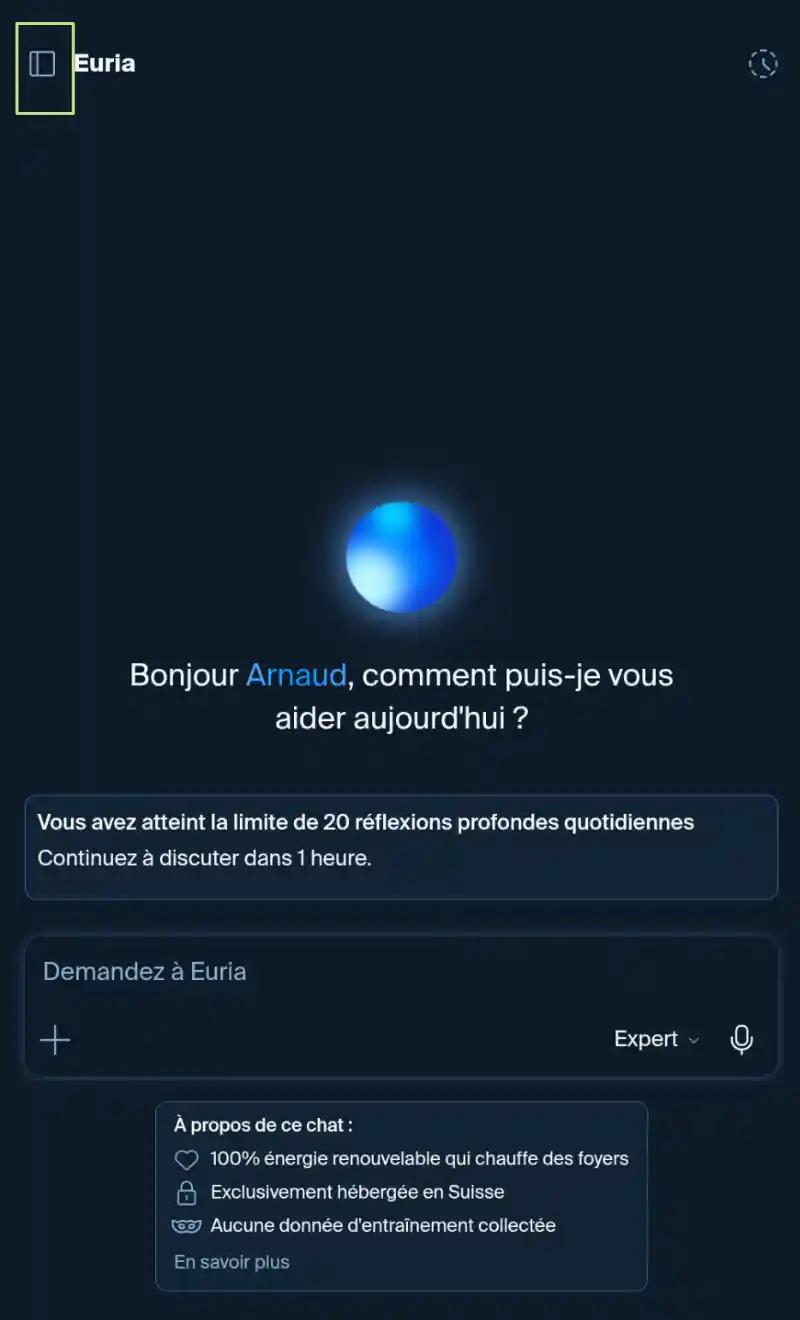
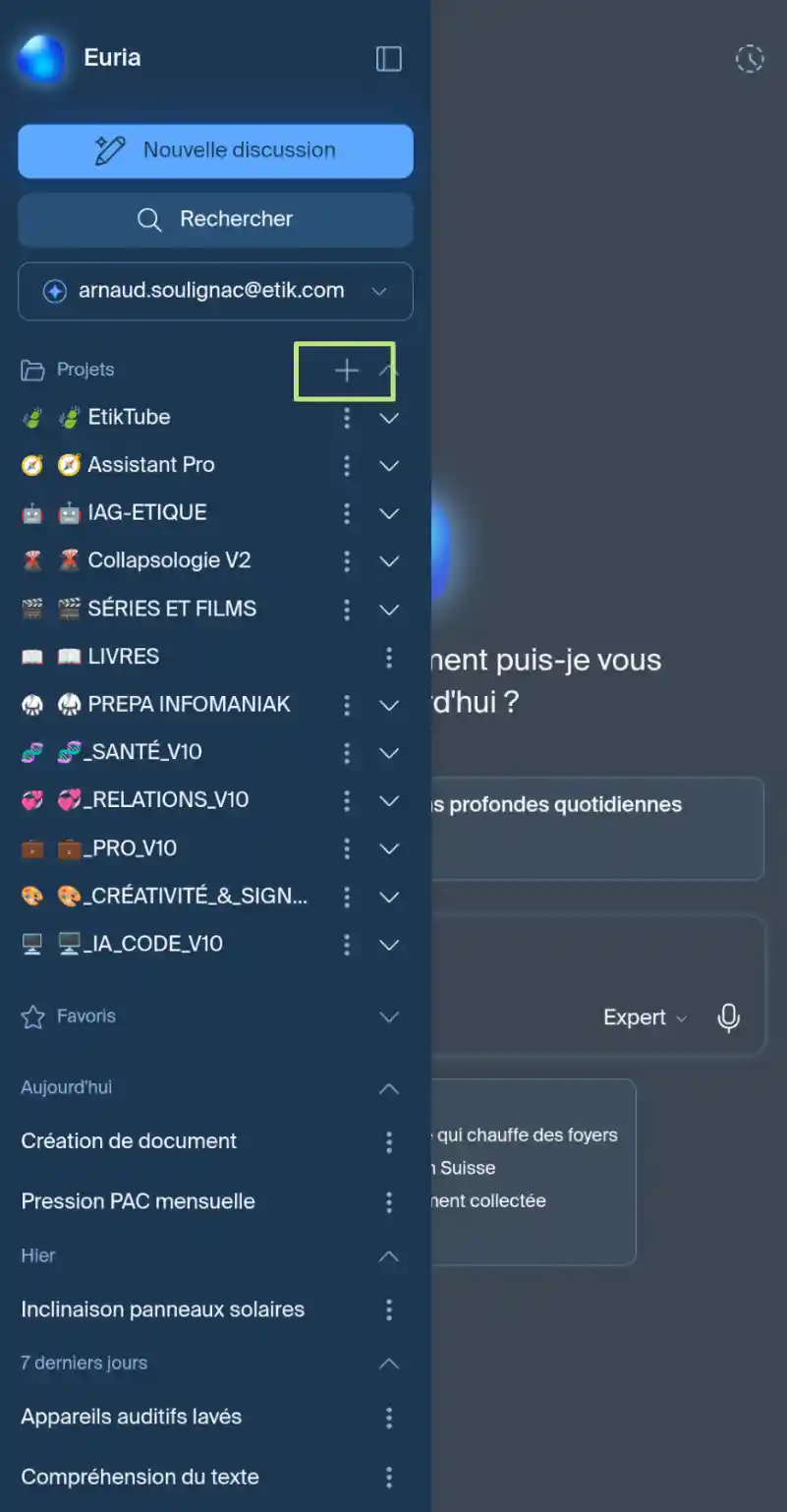
Action : Dans la section Discussions (anciennement "Projets"), clique sur le + pour créer un nouveau projet et nomme-le exactement : Action: In the Discussions section (formerly "Projects"), click the + to create a new project and name it exactly:
Charger le PDF de démarrage Upload the Startup PDF
Tu as téléchargé ce guide au format PDF. Nous allons l'utiliser comme base. You have downloaded this guide in PDF format. We will use it as a base.
Dans ton projet constructions_instructions, cherche la zone pour ajouter un fichier.
In your project constructions_instructions, look for the area to add a file.
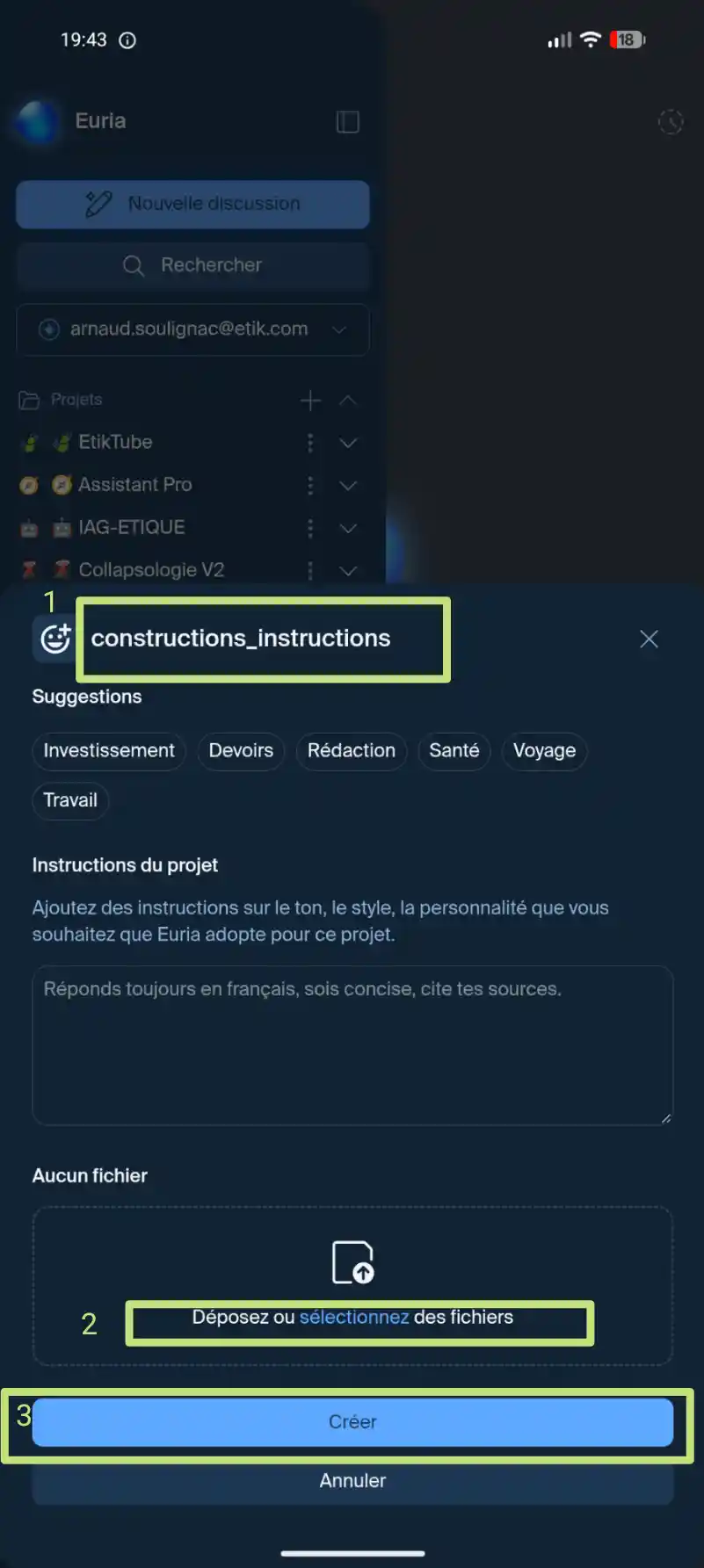
Action :
- Clique sur "Déposez ou sélectionnez des fichiers". Click on "Drop or select files".
- Choisis ce guide PDF. Choose this PDF guide.
- Clique sur le bouton bleu "Créer" en bas. Click the blue "Create" button at the bottom.
Lancer la configuration Start Configuration
Maintenant que le PDF est chargé dans le projet, Euria a accès aux informations de base. Now that the PDF is loaded in the project, Euria has access to basic information.
Ouvre une nouvelle discussion dans ce projet et écris simplement cette phrase magique : Open a new discussion in this project and simply write this magic phrase:
Ce qu'il va se passer : Je vais analyser ta demande et te poser une série de questions très simples (une par une) pour personnaliser ton profil. What will happen: I will analyze your request and ask you a series of very simple questions (one by one) to personalize your profile.
⚠️ Important : Réponds simplement, sans chercher à faire des phrases parfaites. Je m'occupe de tout rédiger. Si tu ne souhaite pas répondre, ou répondre plus tard, dis le également ⚠️ Important: Answer simply, without trying to make perfect sentences. I will take care of writing everything. If you don't want to reply, or later, tell me.
Les questions que je vais te poser The Questions I Will Ask You
Pour construire ton profil parfait, je vais te soumettre ces questions. Tu peux y réfléchir dès maintenant : To build your perfect profile, I will submit these questions to you. You can think about them now:
🗣️ 1. Communication & Ton 🗣️ 1. Communication & Tone
- Tutoiement ou Vouvoiement ? (Par défaut : Tutoiement fraternel) "Tu" or "Vous"? (Default: Fraternal "Tu")
- Ton préféré : Direct, poli, ménagé, humoristique ? Preferred Tone: Direct, polite, gentle, humorous?
🧠 2. Traitement de l'Information 🧠 2. Information Processing
- Synthèses de documents : Veux-tu une synthèse sans perte de données (tout est gardé) ou condensée (l'essentiel seulement, avec perte de détails) ? Document Summaries: Do you want a summary without data loss (everything kept) or condensed (essentials only, with loss of details)?
- Profil psychologique : As-tu de l'humour ? Prends-tu les choses au premier degré ? Es-tu hypersensible ou imperturbable ? (Ceci m'aide à adapter mes réponses). Psychological Profile: Do you have humor? Do you take things literally? Are you hypersensitive or imperturbable? (This helps me adapt my responses).
⚖️ 3. Éthique & Valeurs ⚖️ 3. Ethics & Values
- Souhaites-tu qu'on établisse une charte éthique ensemble qui te représente ? (Ex: écologie, souveraineté, transparence). Do you want us to establish an ethical charter together that represents you? (Ex: ecology, sovereignty, transparency).
💼 4. Professionnel 💼 4. Professional
- Veux-tu créer des instructions pour un emploi actuel ou futur ? Do you want to create instructions for a current or future job?
- Si oui, quelle aide souhaites-tu ? (Rédaction de CV, simulation d'entretien, organisation de tâches ?) If yes, what help do you wish for? (CV writing, interview simulation, task organization?)
🏥 5. Santé & Suivi 🏥 5. Health & Tracking
- Souhaites-tu un module Santé ? (Ex: connaître tes symptômes pour t'alerter, ou créer un journal pour identifier quelle cause crée quel symptôme). Do you want a Health module? (Ex: know your symptoms to alert you, or create a journal to identify which cause creates which symptom).
🔄 6. Mise à jour future 🔄 6. Future Updates
-
Phrase magique pour modifier tes instructions plus tard :
"Mets à jour tes instructions en ajoutant [ta demande]"
ou
"Suite à notre discussion, mets à jour tes instructions" Magic phrase to modify your instructions later:
"Update your instructions by adding [your request]"
or
"Following our discussion, update your instructions"
🔮 7. Anticipation (J'ai ajouté ça pour toi) 🔮 7. Anticipation (I added this for you)
- Confidentialité : Comment dois-je traiter tes fichiers ? (Ex: "Ne jamais citer de noms propres dans les résumés"). Confidentiality: How should I handle your files? (Ex: "Never mention proper names in summaries").
- Format de sortie : Préfères-tu des tableaux, des listes à puces, ou du texte rédigé ? Output Format: Do you prefer tables, bullet points, or written text?
- Gestion de l'erreur : Si je me trompe, veux-tu des excuses plates ou une correction directe et factuelle ? Error Management: If I make a mistake, do you want flat apologies or a direct and factual correction?
🕊️ 8. Instructions Libres (Espace de Liberté) 🕊️ 8. Free Instructions (Freedom Space)
C'est ton espace pour dire tout ce qui n'entre pas dans les cases ci-dessus. Tu peux m'expliquer : This is your space to say everything that doesn't fit in the boxes above. You can explain to me:
- Tes valeurs profondes, tes passions, ce qui t'énerve vraiment. Your deep values, your passions, what really annoys you.
- Une anecdote sur ta façon de travailler que je dois absolument connaître. An anecdote about your way of working that I absolutely must know.
- Tout ce que tu veux que je sache pour être vraiment toi. Anything you want me to know to be really you.
→ Ici, il n'y a pas de règles. Parle-moi comme à un ami. → Here, there are no rules. Talk to me like a friend.
🚀 Prêt à commencer ? 🚀 Ready to Start?
Ne cherche pas à tout comprendre d'un coup. Clique ici pour voir un exemple. Fais simplement l'Étape 2 maintenant : Don't try to understand everything at once. Click here to see an example. Simply do Step 2 now:
- Ouvre Euria. Open Euria.
-
Crée le projet
constructions_instructionsdans la section Discussions. Create the projectconstructions_instructionsin the Discussions section. - Charge ce PDF (Bouton "Déposez ou sélectionnez des fichiers" > "Créer"). Upload this PDF (Button "Drop or select files" > "Create").
- Écris-moi : "Construisons mon PDF d'instructions". Write to me: "Let's build my instructions PDF".
Je prends le relais à partir de là. Je suis là pour toi. I take over from there. I am here for you.